17 / Enterprise tool
Transamerica.
The problem
Transamerica Retirement Solutions sells to large institutional clients. Before a client signs, the account manager, salesperson or business developer has to show what the client's own website and account dashboard would look like. The people on the other side are the client's advisors, plan sponsors, participants and internal staff, and each group expects to see their own organization on the screen.
Producing a sample like that by hand took a developer, and every client wanted something slightly different: a logo, a banner, a set of accounts, a list of beneficiaries. The sales team needed to do it themselves, in a form that stayed within the brand and looked like a real product. The tool also had to fit light customer record keeping, so it was part generator and part small CRM.
A good result let a salesperson build a convincing dashboard without help from a developer.
The approach
I treated the tool as two pieces of work: a plain flow for the salesperson, and a documented system so the developers could build it consistently.
- 01
Flows and sections
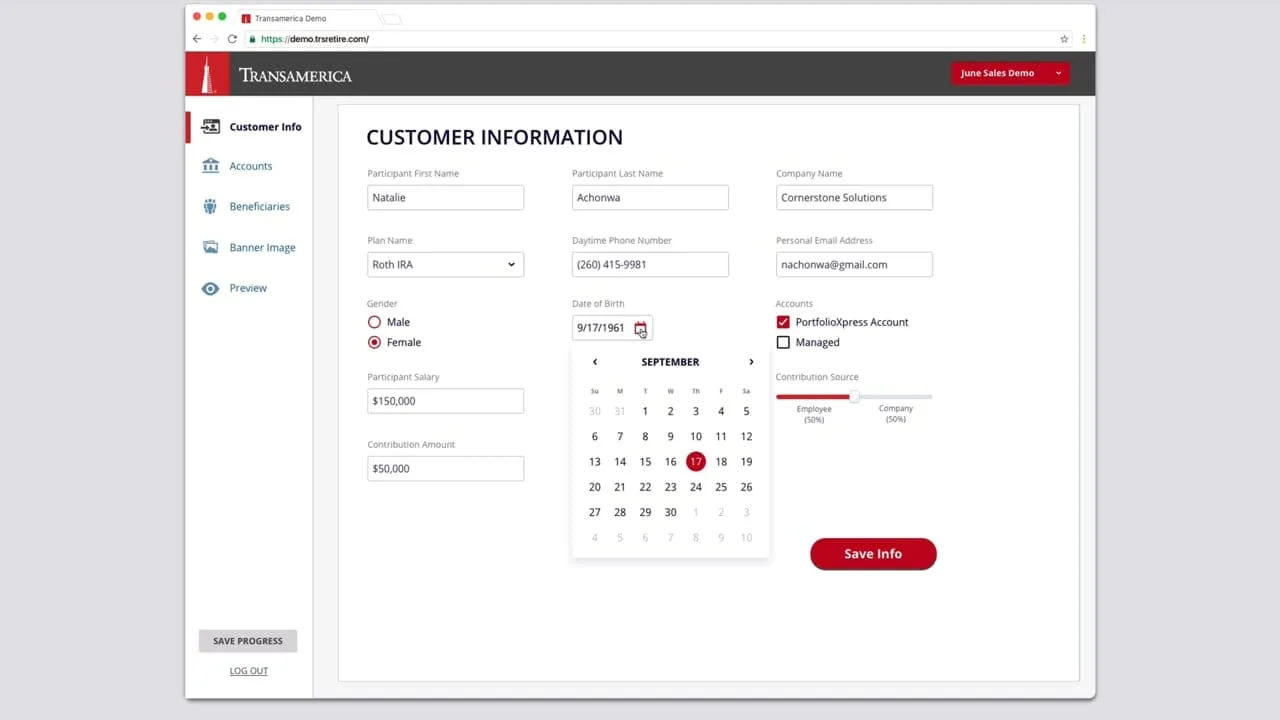
I started by writing out what a salesperson had to enter to produce a convincing demo, and put it in order. That gave five sections down the left side: Customer Info, Accounts, Beneficiaries, Banner Image and Preview. Each one could be filled in on its own, with a Save Progress button always in reach, so a demo could be built across a few sittings.
Final design: customer form. - 02
Form pages with specs
The customer information page is long, so I laid the fields out in a grid that groups related ones: a person's details, plan details, dates and percentages. Then I annotated spacing, type size, color and weight right on the page, so a developer could read the measurements off the design without asking.
Form pages, with specs. - 03
A custom design system
I documented the controls, inputs and buttons as one sheet. Each state of the text input, from empty to hover, filled, disabled and error, shows its height, border, radius and color, and the dropdown spells out its menu and selected item. Writing the states down once meant the form pages could be assembled from the same parts.
The design system. - 04
Managing beneficiaries
Beneficiaries needed to be quick to add and edit, so I used a plain table with name, type, city, state, salary and age, and a red add button above it. Each row has a small menu with Edit, Duplicate and Delete. Duplicate got its own item because demos tend to reuse the same kind of person.
Final design: beneficiaries. - 05
Preview and download
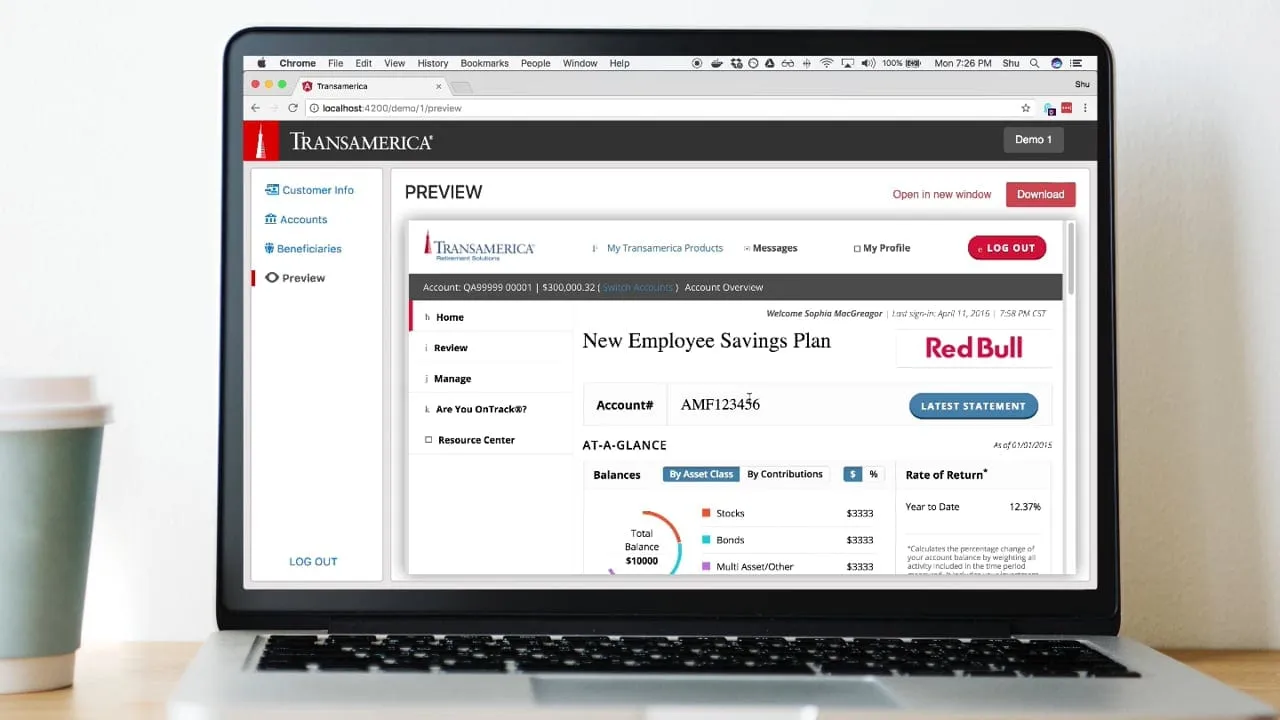
The last section shows the dashboard as the client would see it: a banner with a headline, an account number, balances by asset class and rate of return, with a Download button in the page and in the sidebar. I kept the preview in the same layout as the finished product so a client would not read it as a mock-up.
Final design: account dashboard preview. - 06
CSS for the public site styles
I also wrote annotated CSS notes for the public-facing site styles. A screen of the web page carries callouts for font, size, weight, button radius and brand red. This was light front-end work, kept small, so the generated sites matched the company's own pages and developers did not guess.
Light web development and CSS.
The solution
The application let account managers, salespeople and business developers create sample and highly customized account management dashboards for large institutional clients, with lightweight CRM features alongside. A salesperson fills in customer information, accounts and beneficiaries, picks a banner image, checks the preview and downloads the result. Two videos show the first working prototype and a live build in action.
The design idea was to keep the tool's own screens quiet and put the effort into what it produced. The forms are plain and consistent, so a user can move through them fast, and the preview matches the client-facing dashboard closely. Because every component and spec was documented, the finished pages looked like the same product.
What I delivered
- User flows and wireframes for the generator
- Visual design for forms, tables and the preview
- A custom design system for controls, inputs and buttons
- Annotated form specs with spacing and type
- Annotated CSS for public-facing site styles
See it working
Value added
For people using it
Salespeople and account managers could build a demo for a client on their own, in sections, and see the result as they went. The forms stayed predictable from page to page, which made them quick to learn.
For the business
Sales conversations could start from a dashboard that carried the prospect's own look. That made each pitch more specific, and it did not pull a developer into every request along the way.
For the team
Developers could build from annotated pages and the design system. Measurements, colors and states were written out, so there were fewer questions about spacing and what a field looks like when it errors.
The result
I delivered the design of the tool and a custom design system, along with annotated CSS for the public-facing site styles. A first working prototype and a live build were produced from the designs.
What I took from it
Writing the measurements on the page took longer than drawing the screens, and it removed most of the back and forth with developers. On the next contract I would write the error states into the system on day one, since that is where forms are most often left to guesswork.
Background
In 2015, Transamerica Retirement Solutions described itself as a provider of retirement plan solutions to US employers and their employees.